


Shipt: Order Grocery Delivery
4.511.11K Reviews
App Specs
- Version
- 2.306.0
- Updated On
- License
- Free
- Downloads
- 1,000,000+
- Developer
- Shipt
- Categories
- Food & Drink
- Platform
- Android, iOS
Screenshots
 Analysis by AppCompare
For me, grocery delivery is most useful when it solves a specific problem: a packed day, a difficult trip to the store, or a list of household staples I would rather not carry home. Shipt: Order Grocery Delivery is a free Food & Drink app from Shipt, built around ordering groceries for delivery from participating local stores. Its focus is convenience, but whether that convenience feels worthwhile depends on how you shop, which stores appear near you, and how much flexibility you have around delivery.
What free access does—and does not—tell you
The app itself is free to download, so you can start exploring it without paying an upfront purchase price. That is useful when you want to see which nearby stores are available before deciding whether this kind of service belongs in your routine. The app has a 4.6 average from around 41,000 ratings, and it has been installed over a million times, though those figures tell me about its reach rather than whether a particular order will suit your needs.
I would separate the cost of getting the app from the cost of placing orders. Free access does not mean every delivery is free, and I would check the charges and terms shown during checkout before committing to a basket. The published app details establish that the app is free; they do not establish a universal delivery price or membership arrangement, so I would not assume one applies to every shopper or location.
Where the convenience earns its keep
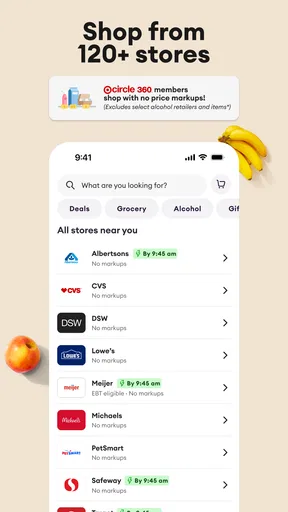
Shipt makes the most sense when the value is measured in time, effort, and carrying less—not simply in the price of groceries. If you are recovering from a long day, caring for a child, or unable to get to a store easily, having groceries brought to you can matter more than making a separate trip. Its reach across 120 stores also gives the service a broader starting point than an app tied to a single supermarket, although the useful choices still depend on what is available around your address.
A practical way to judge it is to build a modest basket of items you already know you need, then review the final checkout details before placing the order. That lets you compare the convenience against your normal store trip without turning a first try into a large commitment. I would also look at whether the stores shown match the products you actually buy; a long list of locations is less valuable if your preferred basics are not among the options nearby.
How the shopping experience fits real routines
One everyday situation where I can see this helping is getting home late and realizing breakfast supplies and a few dinner ingredients are missing. Instead of making another trip, I could check the available stores, put together only what I need, and choose a delivery window that works with the rest of the evening. That is a better use of delivery than treating the app as an automatic replacement for every grocery run: it can take pressure off a busy day while leaving planned, price-sensitive shopping for another time.
Why the ordering workflow matters
Shopping on a phone changes how I think about the list. Searching for familiar products can be quicker than walking aisle by aisle, but it also makes it easy to overlook an item that is obvious when you are standing in front of a shelf. I would build the basket from a written list, then scan it once more by meal or household task before checkout. That small habit can prevent a convenient order from arriving without the one ingredient the rest of dinner depends on.
Worth Reading Before You Choose

EA SPORTS FC Mobile 26 Is a Bigger Football Game, but It Takes Time

Flipboard Shows What News Apps Must Do Beyond the Feed

Switching to Android Auto Means Rethinking Your Driving Routine

Google Calendar Makes a Crowded Week Easier to Manage

Ludo King Makes the Most of the Minutes Between Plans

Baby Panda World Brings Quick Play to Modern Phones, but Its Game Library Feels Busy
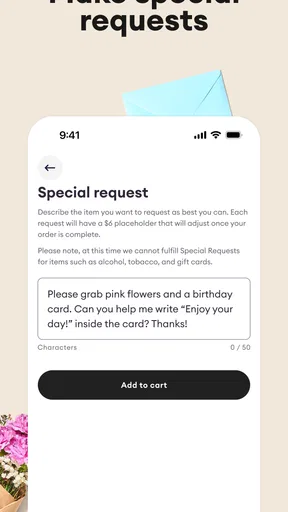
For repeat purchases, saving commonly needed items can reduce the work of rebuilding a basket from scratch. I would still review saved choices rather than blindly reordering: household needs change, and a stored item may not be the right size or option this time. Special instructions are useful for communicating a preference, such as asking for bananas that are not overly ripe, but they are requests rather than a guarantee. For produce or other items where exact selection matters, I would be ready to accept that a shopper may have to make a judgment call.
Substitutions and the human element
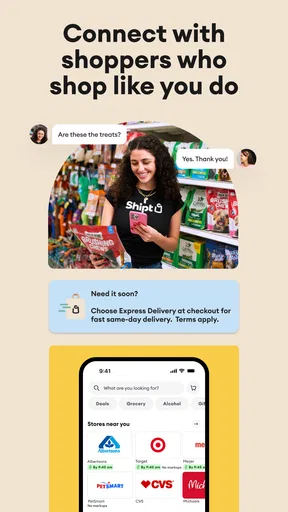
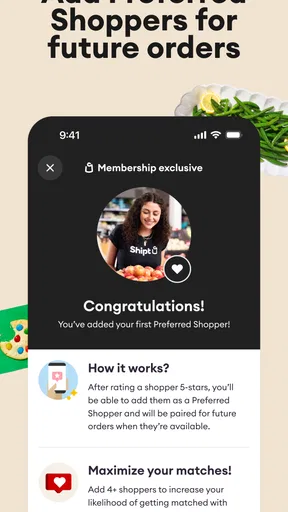
The shopper is an important part of this experience, not just the person carrying bags to the door. If an item is unavailable, a message and a suggested replacement can help you decide whether an alternative works before it is chosen. I would keep my phone reasonably close during the shopping period and think through acceptable substitutes in advance—for example, whether another brand or a different size would be fine. That is a simple way to make an out-of-stock situation less disruptive.
This flexibility is also a trade-off. A store trip lets me inspect the shelf and make the substitution myself; delivery asks me to trust a shopper’s selection and respond to messages when a decision is needed. If I am buying something where a precise variety, ripeness, or package matters, I would add a clear note and stay available. If I cannot be reached or would rather choose every item personally, shopping in person may be the better fit for that particular order.
Delivery timing and planning around it
Choosing a delivery window can make the service easier to fit around work, family, or other plans. Same-day delivery can be useful when the need is immediate, while a later window may suit someone who can plan ahead. I would avoid scheduling an arrival at the exact moment I need to leave home or join a call: even when an app provides updates, a delivery is still one more moving part in the day, and allowing a little flexibility makes the arrangement less stressful.
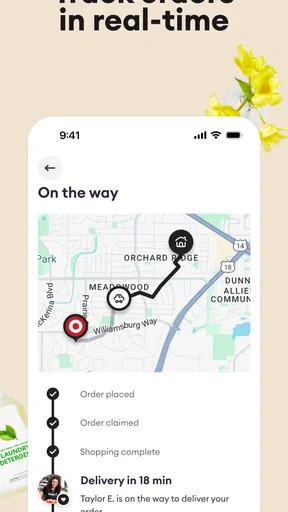
Notifications and shopper tracking help show how an order is progressing, which is more reassuring than placing a request and hearing nothing until the doorbell rings. I would use those updates to stay prepared, not as a reason to assume every delivery will follow the same timing. If a schedule is tight, I would choose a window that leaves room for ordinary delays and make sure I can respond if a replacement question comes through.
How it compares with other ways to shop
Compared with going to the supermarket myself, Shipt trades direct control over product selection for less travel, walking, and carrying. A regular store trip is still stronger when I want to compare items in person, pick exact produce, or combine grocery shopping with errands nearby. Compared with ordering from one store’s own service, Shipt’s multi-store approach can be more convenient when several local options are available, but it does not remove the need to check which retailers serve your address and what each one carries.
Pickup is another useful comparison. If I can drive to a store and collect an order without much trouble, pickup may offer a middle ground between shopping aisle by aisle and having groceries brought to my door. Shipt is more appealing when leaving home is the main obstacle; it is less compelling if I already pass a store, enjoy choosing my own items, or want to avoid any extra service costs shown at checkout. I would choose based on the problem I need solved rather than assume delivery is always the better option.
Who is most likely to benefit
I can see Shipt working especially well for people with crowded schedules, parents trying to manage errands with children, anyone who finds carrying a full grocery load difficult, and households that occasionally need a convenient same-day option. It can also help when a short list needs attention but a full shopping trip would take too much time. The app is rated for Everyone, and its current version is 2.299.0, with iOS 8.0 listed as the minimum operating-system requirement.
It may be the wrong choice for someone whose main goal is to inspect every item personally, who prefers to shop only at a particular retailer that is not available nearby, or who is making a very small purchase where delivery charges could outweigh the time saved. It is also not ideal if you cannot be available to answer substitution questions and would be unhappy with a shopper choosing an alternative. In those cases, an in-person trip or store pickup may give you more control.
Getting a fair first impression
When trying Shipt, I would begin with a familiar, uncomplicated list rather than a complicated shop full of specific produce requests and hard-to-replace products. Check the available stores, compare the order total at checkout with what you expect to spend, add concise notes only where they genuinely help, and keep an eye on messages while the shopper is working. This gives you a realistic sense of how the service fits your household without expecting the first order to answer every question about future use.
Shipt has been available since April 6, 2015, and its combination of a large store network and shopper communication gives it a clear role in grocery delivery. Still, the quality of the experience depends on local store selection, the items in your basket, and whether the delivery timing suits your day. I would treat the 4.6 average as a useful general signal, not a promise that every order will be perfect.
Getting Started with Shipt
Setting up Shipt was a breeze. Once you download the app from your favorite app store, the onboarding process is straightforward and intuitive. You simply enter your delivery address, and bam! You’re ready to start adding items to your cart. The app connects you to local stores like Target, Costco, and more, depending on your location.
Browsing and Adding Items
The interface is user-friendly with a clean design. You can browse through categories or use the search function to find specific products. I love how you can see detailed descriptions and even customer reviews for each item. It’s like having a mini supermarket in your pocket!
Adding items to your cart is just a tap away. You can even save items for future shopping lists, which is a neat feature if you tend to buy the same groceries frequently. Plus, there’s an option to add special instructions for each item. Want ripe bananas? Just let your shopper know!
Scheduling Your Delivery
Okay, here’s where it gets even better. You can choose a delivery window that fits your schedule. Whether you need your groceries ASAP or later in the week, Shipt has got you covered. I scheduled mine for the same day, and the delivery was right on time.
The app sends you notifications every step of the way, so you’re never left wondering where your groceries are. You can even track your shopper in real-time, which adds a layer of transparency to the whole process.
Experience with the Shipt Shoppers
Now, let’s talk about the real stars of the show—the Shipt Shoppers. My experience was fantastic. My shopper was communicative, friendly, and even texted me when certain items were out of stock to suggest replacements. It felt like a personalized shopping service, and I didn’t have to lift a finger.
Plus, the app allows you to tip your shopper, which I think is a great way to show appreciation for their hard work. And trust me, they deserve it!
Overall Impressions
So, what’s the final verdict? Shipt is a game-changer for anyone looking to simplify their grocery shopping routine. With its easy-to-use interface, reliable delivery, and excellent shopper service, it takes the stress out of buying groceries. Sure, there’s a membership fee, but if you value your time and convenience, it’s worth every penny.
Whether you’re a busy parent, a college student, or just someone who dreads grocery shopping, give Shipt: Order Grocery Delivery a try. It might just be the app you never knew you needed.
Pros
- User-friendly interface for easy navigation.
- Wide variety of stores to choose from.
- Real-time order tracking available.
- Option to schedule deliveries in advance.
- Shoppers communicate via chat for updates.
Cons
- Membership fee required for delivery access.
- Not available in all regions.
- Limited delivery slots during peak times.
- Occasional item substitutions without notice.
- Some stores have higher pricing compared to in-store.
FAQs for Shipt: Order Grocery Delivery
What is Shipt and how does it work?
Shipt is a grocery delivery service that allows you to order groceries and have them delivered to your doorstep. You can browse through a wide selection of products, add them to your cart, and schedule a delivery at your convenience. A Shipt Shopper will then pick up your items and deliver them to your location.
How much does Shipt cost?
Shipt offers a membership model that costs $99 per year, providing you with free delivery on orders over $35. Alternatively, you can opt for a pay-per-order option, which incurs a delivery fee. Prices of products may vary slightly from in-store prices to cover the service costs.
Can I use Shipt without a membership?
Yes, you can use Shipt without a membership by choosing the pay-per-order option. This allows you to pay a delivery fee each time you place an order without committing to a yearly subscription. This can be a flexible choice for occasional users.
What stores does Shipt deliver from?
Shipt partners with a variety of local and national retailers, including Target, Meijer, and CVS, among others. The available stores can vary depending on your location, so it's best to check the app to see which retailers are accessible in your area for delivery.
How does Shipt ensure the quality and freshness of groceries?
Shipt employs trained shoppers who are committed to selecting the freshest and highest quality products. They communicate with you throughout the shopping process, allowing you to provide input on product preferences and substitutions if needed, ensuring a satisfying shopping experience.


